
The HVAC company said they'd send someone Tuesday. It's Thursday. The toner order went in two weeks ago but nobody checked it arrived, the new paralegal starts Monday without a laptop, and the software renewal that auto-charged $2,400 last night was for a tool the office stopped using in the spring.
None of that is hard work. It's follow-through, and in a small office it all lands on one person: the office manager. I've spent the last four years building AI systems and agents for businesses, and the office manager seat is one where I see the clearest split. Most of the job is chasing, logging, ordering, booking and reminding, which an AI Employee does well. A smaller part needs someone standing in the office or making a call about money or people.
This post covers what that coordination work looks like, what an AI Employee can own, what should stay with a person, how one is set up and what it costs.
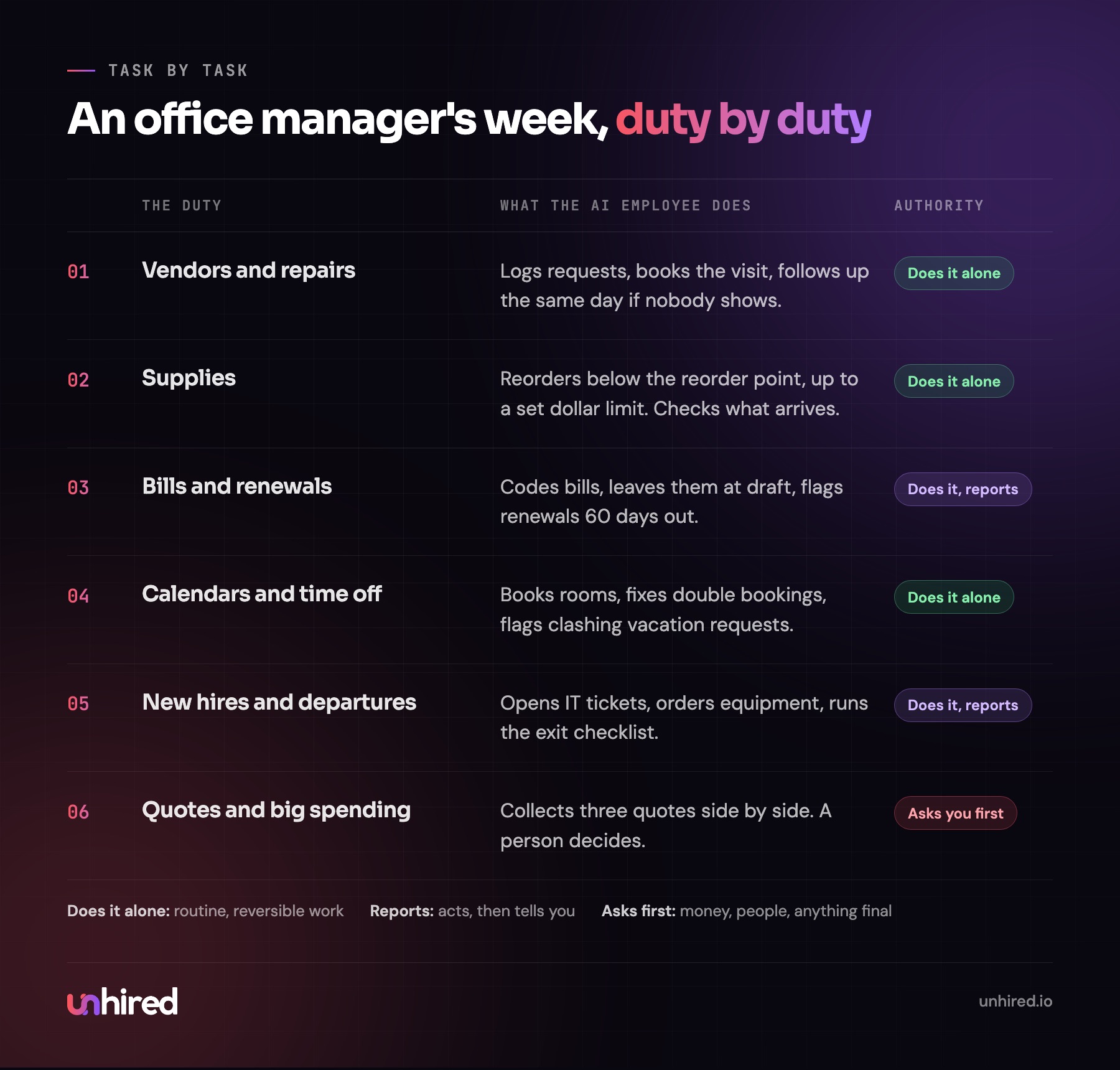
What an office manager actually does all week
The title covers a lot. At a dental clinic the office manager might also run the front desk schedule. At a law firm they handle the lease, the copier contract and the conflict-check binder. At an e-commerce company with ten people they're the one who knows the Wi-Fi password, the payroll cut-off and which supplier gives net-30 terms.
Strip out the industry details and the same six jobs show up almost everywhere:
- Vendors and facilities: service requests, quotes, follow-up, building management.
- Supplies: noticing what's low, reordering, checking the order arrived and matches the invoice.
- Bills and renewals: coding bills, getting approvals, tracking subscriptions and contract end dates.
- Calendars and rooms: the shared calendar, meeting rooms, staff time off, deliveries.
- People admin: new-hire setup, departures, keeping the staff list and emergency contacts current.
- The office inbox: "quick question" emails from staff, clients and vendors all day.
An AI Employee in this seat holds those jobs the way a person would. It reports to the owner or the practice manager, has its own logins to the shared inbox, calendar, accounting tool and supplier accounts, and works under written rules about what it can do on its own and what it brings to a person. Every action goes into a log.
The parts an AI Employee can own
Vendors and service requests
When a staff member reports that the kitchen sink is leaking, the AI Employee logs it, emails or texts the plumber the office uses, confirms the visit and puts it on the calendar. If nobody shows by the agreed time, it follows up the same day instead of a week later. When a job needs quotes, it requests three, puts them side by side with the price, timing and terms, and sends that to the person who decides.
Supplies
It keeps a simple list of what the office uses and how fast: paper, toner, coffee, gloves at a clinic, shipping labels at an online store. When something drops below the reorder point, it places the order through the supplier account up to a set dollar limit. When the box arrives, it checks the packing slip against the order and flags anything short or wrong.
Bills, subscriptions and renewals
This is the one that saves real money in a lot of offices. The AI Employee reads incoming bills, codes them in QuickBooks Online, Xero or Bill, matches them to the purchase or contract, and leaves them at draft for approval. It also keeps a calendar of every subscription and contract end date, and sends a note 60 days before each one: renew, cancel or renegotiate? The general bookkeeping side of this is in the post on the AI bookkeeper.
Calendars, rooms and time off
It books the boardroom and sorts out double bookings. Vacation requests get checked against the team calendar, and it points out when three people from the same team asked for the same week. Deliveries and visitor appointments go on the calendar with a reminder to whoever is in the office that day. The scheduling side is covered in more depth in the post on the AI scheduling assistant.
New hires and departures
A week before someone starts, it opens the IT ticket for their email account, requests the laptop, orders the keycard, adds them to the staff list and emergency contacts, and sends the welcome email with what to bring on day one. When someone leaves, it runs the reverse checklist so accounts get closed and equipment comes back. The paperwork for pay and benefits belongs to HR, and the AI HR Administrator breakdown covers that part.
The office inbox
"Where do I send my mileage?" "What's the guest Wi-Fi?" "Is the office open on the holiday Monday?" The AI Employee answers these from a short office handbook, at any hour, and routes anything it can't answer to the right person with the question written up.
What should stay with a person
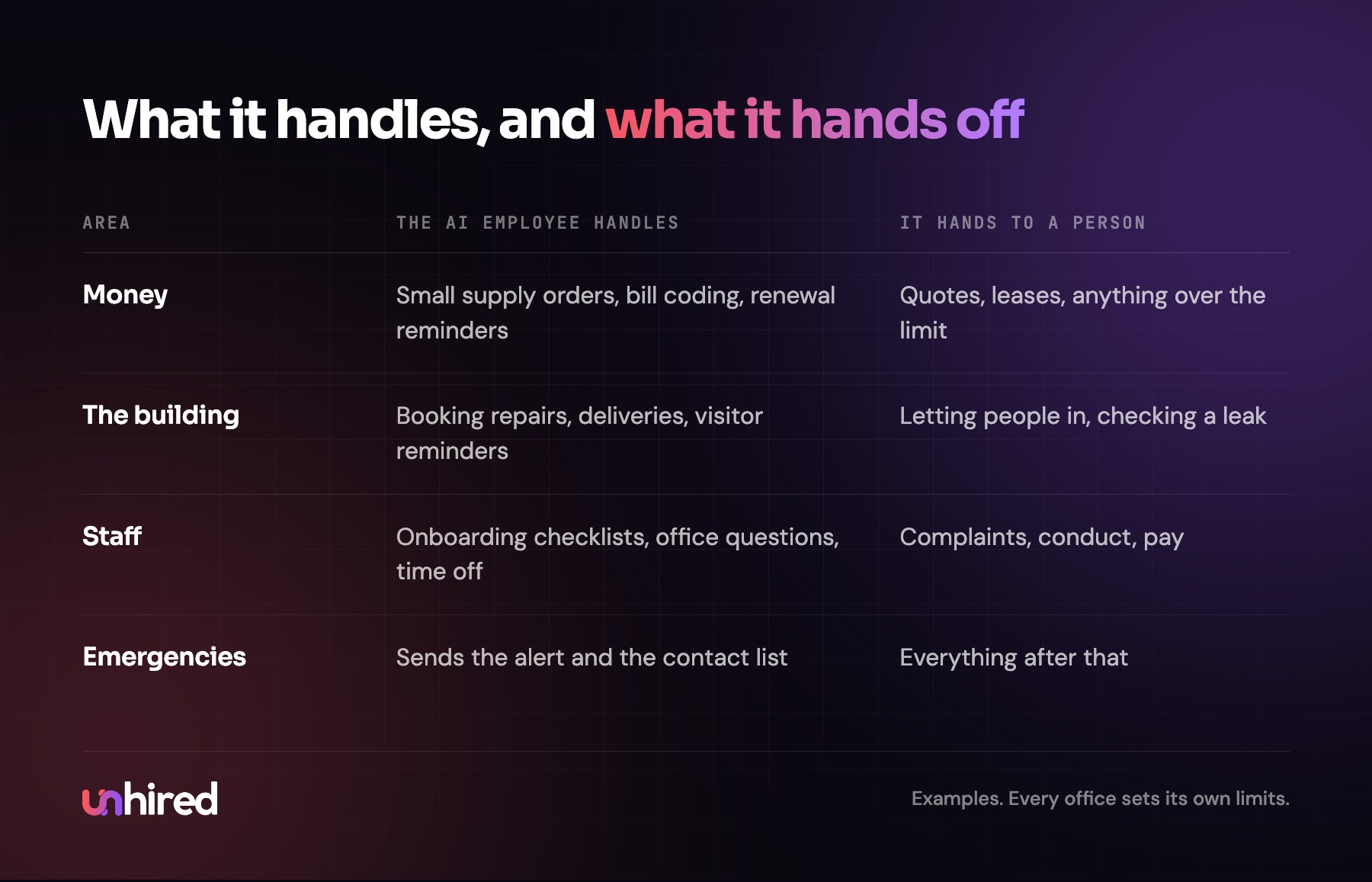
The handoff rules matter more here than in most roles, because an office manager touches money, the building and the people in it. These are the things I'd always route to a named person:
- Spending above a limit. The AI Employee can place a $90 supply order on its own. A $6,000 HVAC quote, a new lease or a contract change waits for approval.
- Anything that needs a body in the building. Letting the technician into the server closet, checking a leak, signing for a delivery that needs ID.
- People issues. A complaint about a coworker, a conduct problem, someone upset about their schedule. The AI Employee logs that the message came in and passes it on without trying to resolve it.
- Pay and benefits. Payroll changes, expense disputes and anything about what someone is paid.
- Safety and emergencies. A break-in, a gas smell, a fire alarm. It sends the alert and the contact list, and a person takes it from there.
- Anyone who asks for a person. Staff and vendors get a human on the first request.
A Wednesday in a small office
Here's an example Wednesday for an AI office manager at a 15-person law firm. Three items go to the managing partner, and that's what a healthy log looks like.
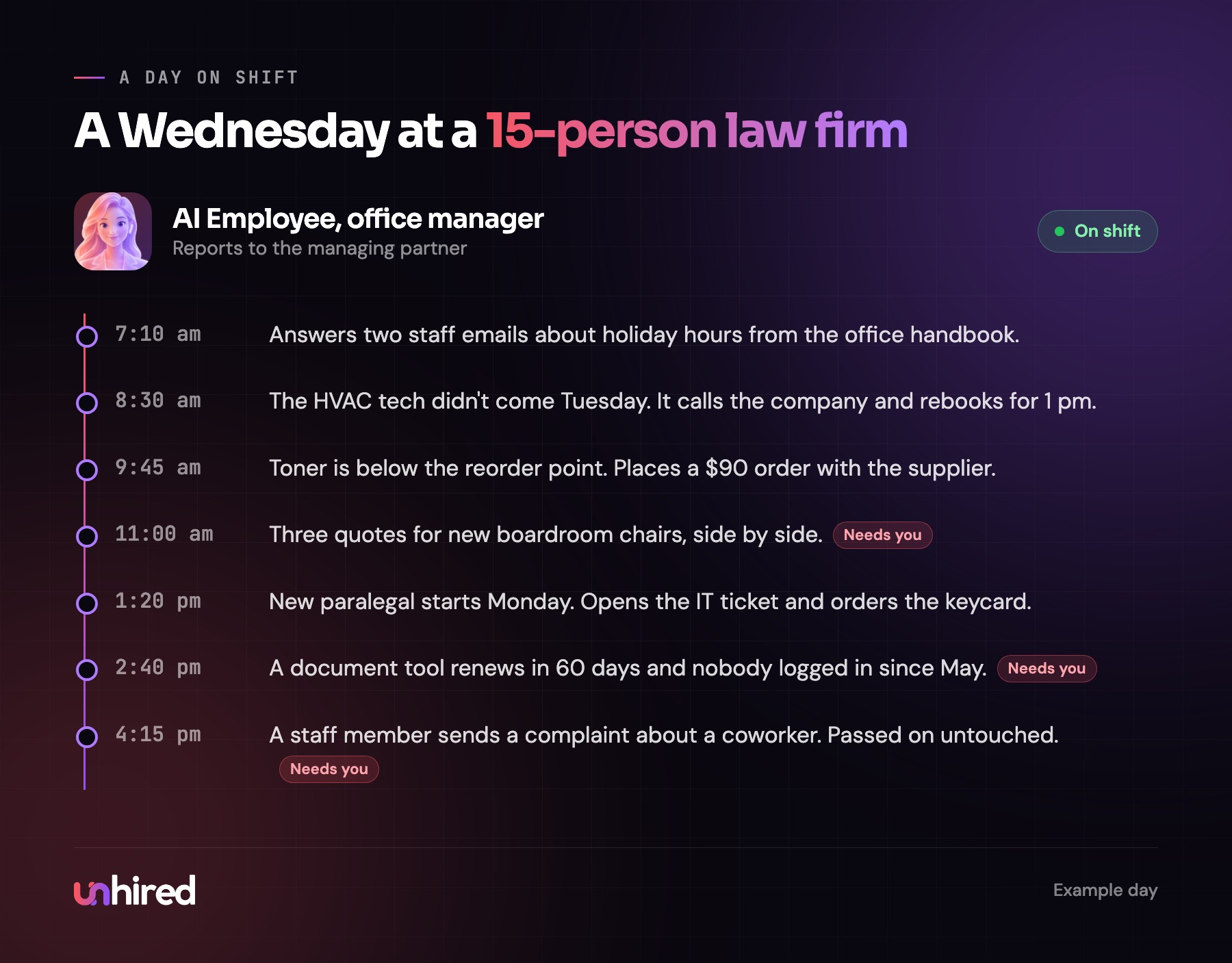
The renewal reminder is the one I'd point to. A tool nobody uses gets cancelled 60 days before it charges again, because a calendar entry and a short message did the remembering instead of a person.
How an AI office manager is set up
The work in setting one up is mostly getting the office manager's knowledge out of their head and into writing.
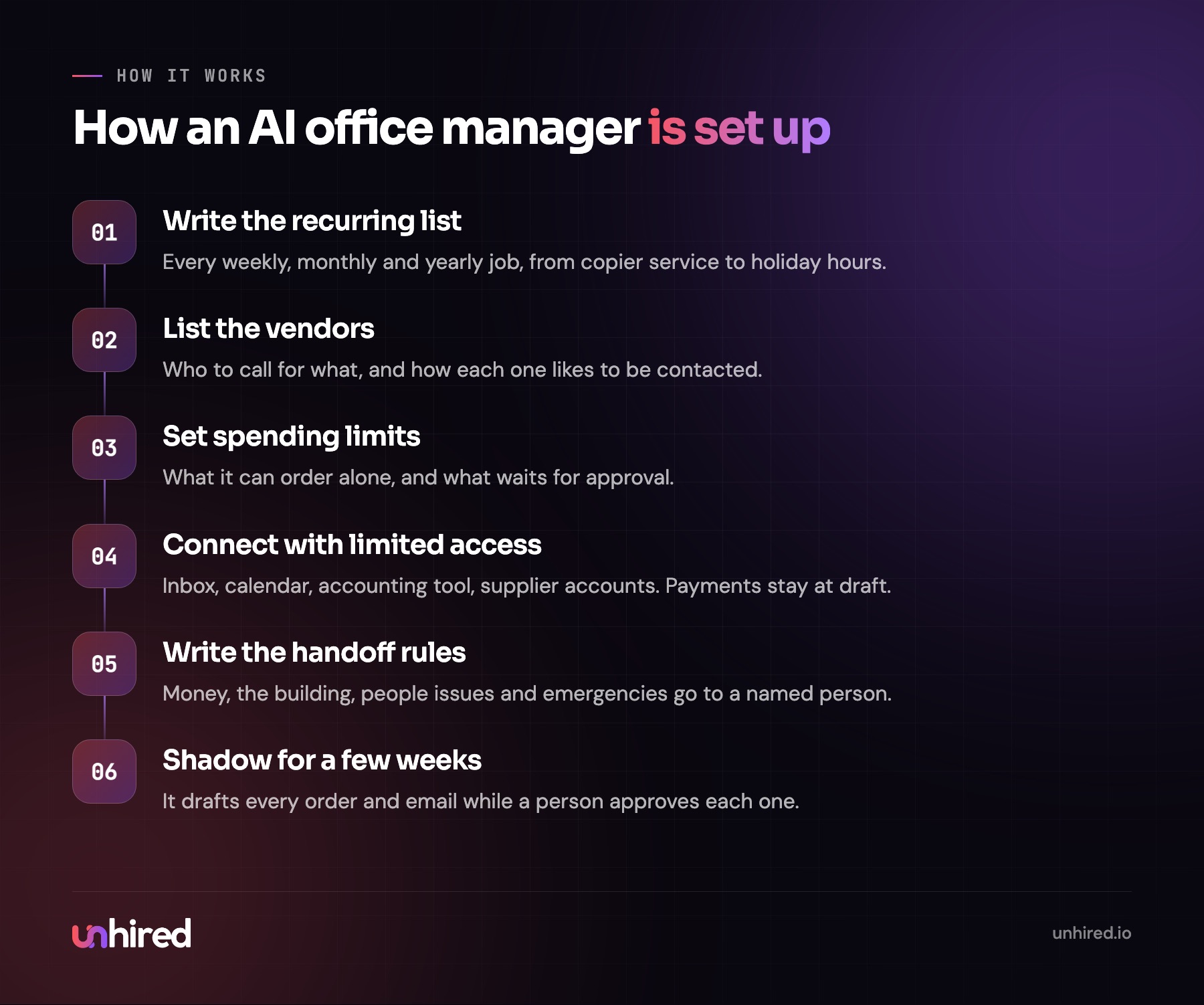
Start with the recurring list. Every office manager has one, even if it's never been written down: the copier service every quarter, the alarm code change when someone leaves, the fire extinguisher inspection, the holiday hours email in November. That list becomes the AI Employee's calendar. The vendor list comes next, with who to call for what and how each one prefers to be contacted, then the spending limits and the handoff rules.
For the first few weeks, it drafts every vendor email, every order and every bill code, and a person approves each one. As the drafts come back right, it takes on more on its own. The post on onboarding an AI Employee covers that shadowing period in more detail.
What the seat costs a person
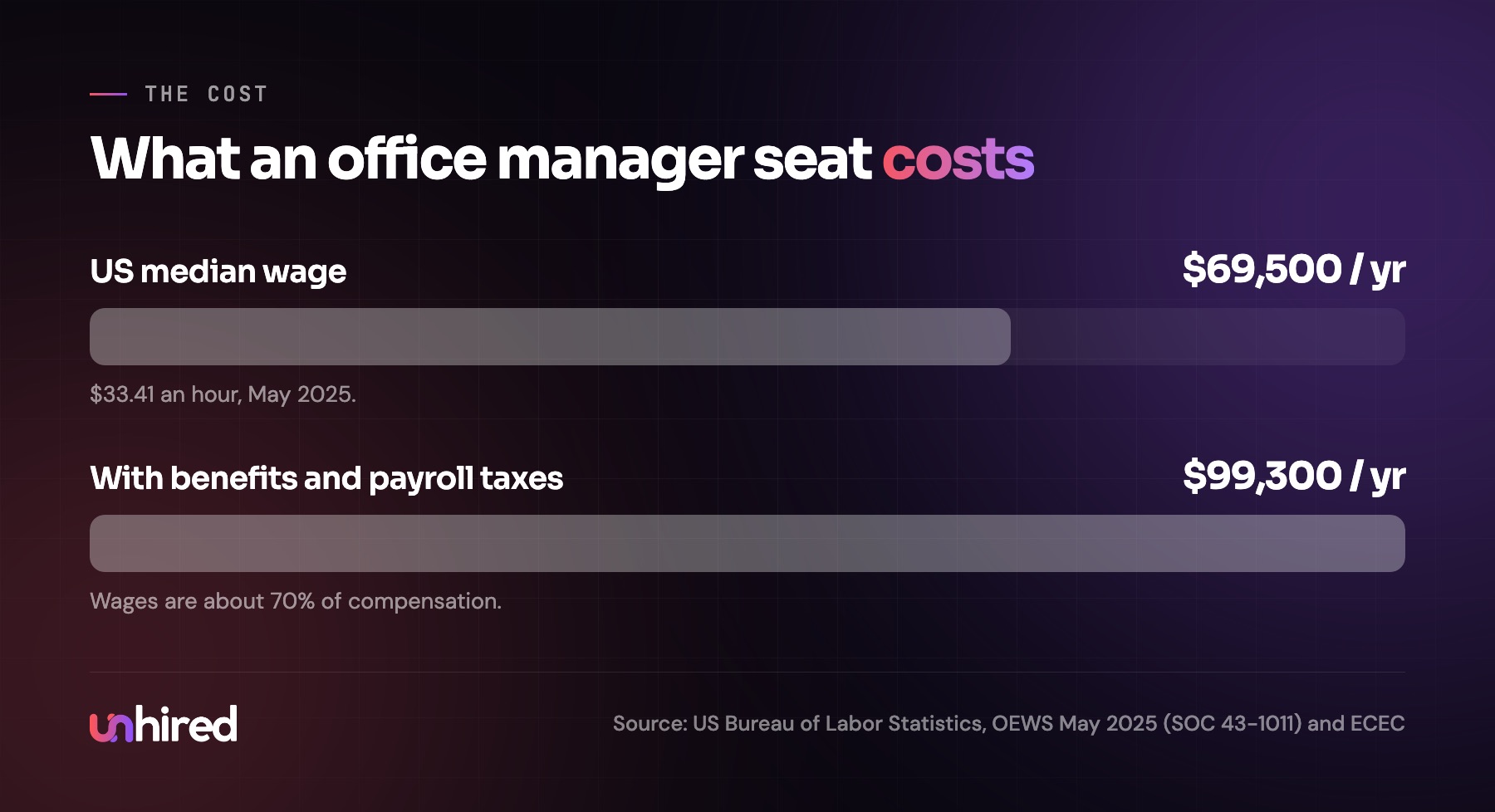
The US Bureau of Labor Statistics counts most office managers as first-line supervisors of office and administrative support workers. The median wage was $69,500 a year ($33.41 an hour) in May 2025, across about 1.44 million people in the role.
Wages are only part of it. Across US private industry, wages and salaries are 70% of what employers spend on compensation, according to the BLS Employer Costs for Employee Compensation report. At that ratio, an office manager at the median costs about $99,300 a year before recruiting, training and the weeks the office runs without one when they leave.
How much you'd pay for an AI office manager
There are two common ways to get one. You can assemble it from software: an AI agent platform, connections to your inbox, calendar and accounting tool, and access to your supplier accounts. The subscriptions are usually the smaller part of the cost. The bigger part is someone's time writing the recurring list and the spending limits, testing it, and keeping it current when you change suppliers or move offices.
Or a provider builds and maintains it, usually for a monthly fee. You pay more than the bare software, and someone else handles setup, updates and reviewing the log.
The price moves with how many systems it connects to, how many requests come through each week, whether it handles bills or only logistics, and how much ongoing maintenance is included. A five-person agency with one supplier needs much less than a multi-location clinic with a facilities contract at each site.
To compare quotes, set them against the full cost of the seat: about $99,300 a year at the median for roughly 40 hours of coverage a week.
Is your office a good fit?
If your office manager spends most of the day on the floor, greeting clients and fixing the coffee machine, an AI Employee has less to take on, and the person is doing the part of the job that needs a person.
If they spend most of the day in the inbox, chasing vendors, coding bills and keeping track of renewals, the coordination half of the role is a strong candidate for an AI Employee. That can mean the person you have spends more time on the work that needs them, or that the seat you were about to post becomes a smaller one. AI Employee assessments, such as the one offered by Unhired, can be a good place to check whether a role like this fits.
A practical first step works whatever you decide. Ask whoever runs your office to keep a list for two weeks of every task they do, tagged as "chasing or logging" or "needed me there or needed my judgment." Then write down every subscription and contract the office pays for, with its renewal date. Forgotten charges tend to show up on that second list.
Wage data: US Bureau of Labor Statistics, Occupational Employment and Wage Statistics, May 2025. The Wednesday schedule is an example built from the duties in this post.