
An online store's AI Employee gets an email from a customer whose order arrived broken. It's polite, it apologises, and it offers a full refund plus a discount code on the next order. The refund is fine. The discount code isn't, because nobody at the store ever offered one. The AI Employee had seen a discount mentioned in an old marketing email it was given as an example, and it decided that's what good service looks like here.
I've spent the last four years building AI systems and agents for businesses, and most of the problems I've seen came from the same place. Someone asked what the AI could do and never wrote down what it shouldn't. An AI Employee is very good at a lot of office work. It also has real limits, and the businesses that get the most out of one are the ones that know where those limits sit before it starts.
Those limits come in two kinds. Some are things it can't do at all. Others are things it could do, and you shouldn't let it.
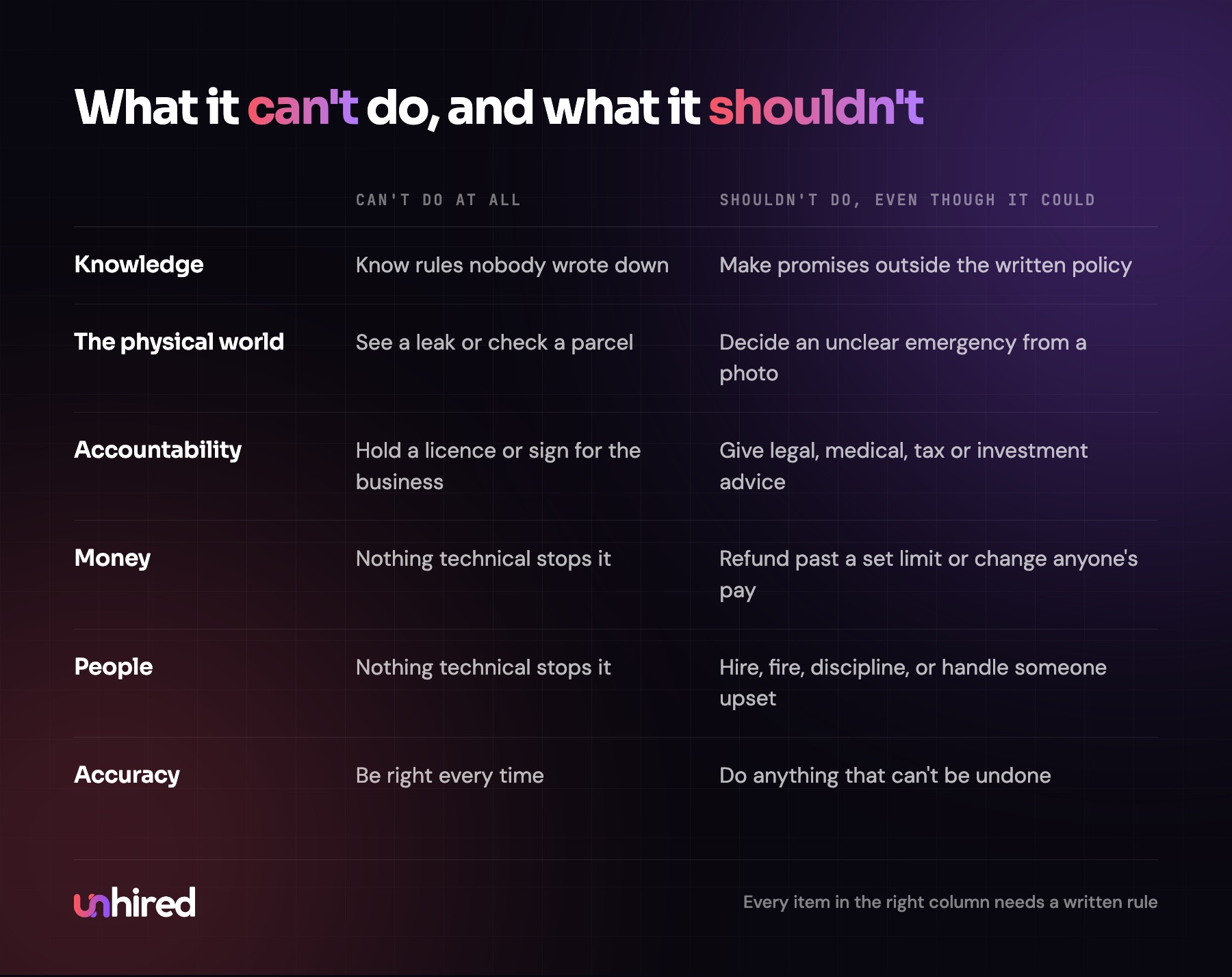
What an AI Employee can't do
Know what nobody wrote down
An AI Employee knows the instructions, documents and examples it was given, plus whatever it can look up in the systems it's connected to. It doesn't know that the dentist runs late on Thursdays, that one client always pays in the third week, or that the owner promised a tenant a new fridge on the phone last month. If it isn't written somewhere it can read, it doesn't exist.
That's why so much of the setup is writing. I covered how to do it in how to train an AI Employee. The limit doesn't go away with training, though. Any business keeps making new decisions in hallways and on phone calls, and each one is invisible to the AI Employee until someone types it up.
See or touch anything
It works through email, text, phone lines and software. It can't look at a water stain on a ceiling or notice that a patient in the waiting room looks unwell. It can ask someone to send a photo and describe what it sees in the photo. It can't walk over and check.
For a property manager, that means the AI Employee can log a maintenance request, ask for pictures and book the plumber, but someone still has to decide whether a leak is an emergency when the photo is unclear.
Be the accountable person
A law firm's AI Employee can't be the lawyer. A clinic's can't be the clinician, and an accounting firm's can't sign a return. Professional licences, signatures and legal responsibility belong to people. The AI Employee can prepare nearly everything around that work, like the intake notes and the draft letter, and then the professional reviews it and puts their name on it.
Be right every time
AI models sometimes produce a wrong answer in the same calm, confident tone as a right one. Current documents and checks against the source system before anything is saved make this rare. Rare isn't never, though. Someone has to read its log, and the first month needs a person approving its work before it goes out.
The legal side of a wrong answer is settled enough to plan around. In February 2024 a Canadian tribunal ordered Air Canada to compensate a customer after the chatbot on its website described a bereavement fare policy the airline didn't have, and it rejected the airline's argument that the chatbot was responsible for its own words (Fox Business coverage). Whatever your AI Employee tells a customer, your business told them.
What an AI Employee shouldn't do, even when it could
This second list matters more, because nothing technical stops an AI Employee from doing these things. Give it access to the payment system and it can issue a refund of any size. The limit has to be a written rule.
I'd keep these with a person in almost every business:
- Money past a set limit. It can issue a refund or credit under an amount the owner picks and writes down. Anything above that, or anything outside the written policy, waits for approval.
- Changing what someone is paid, or what a customer is billed on a contract.
- Advice that needs a licence: legal, medical, tax and investment. It can answer "what are your fees?" and "when can I come in?" and pass everything else to the professional.
- Hiring, firing, discipline and performance reviews. It can schedule the interviews and collect the paperwork, and people make the decision.
- Promises outside policy, like the discount code in the opening. If the handbook doesn't allow it, the AI Employee doesn't offer it.
- Conversations with someone who is angry, grieving, frightened or threatening legal action. It should say a person will be in touch today, and then make sure one is.
- Anything that can't be undone, such as deleting records, cancelling a contract or sending a letter to a regulator.
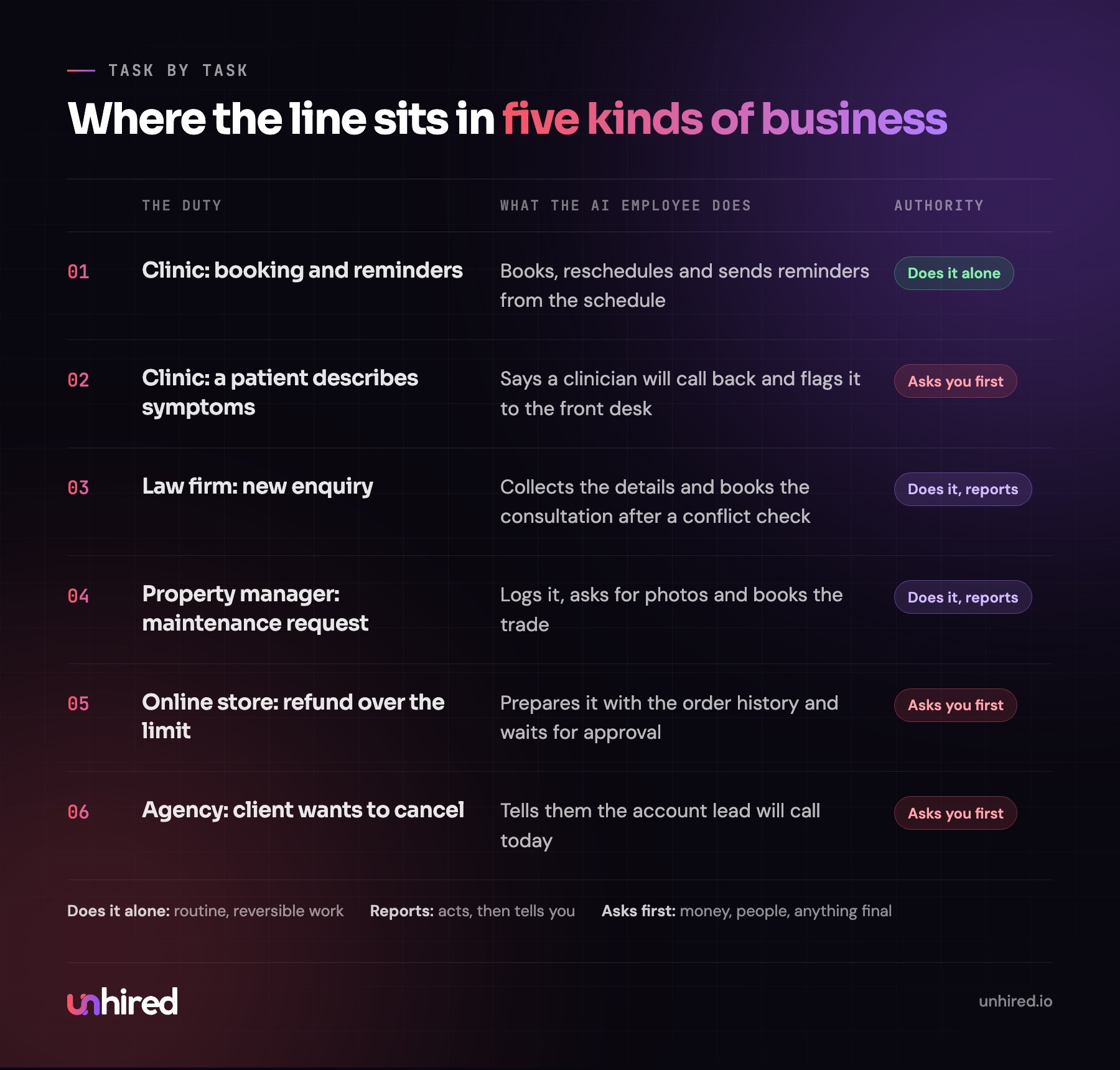
Each of those comes down to the same thing. When a mistake would cost someone their money, their health or their job, or can't be reversed, a person should make the call. The AI Employee's job is to get that person everything they need to decide in two minutes instead of twenty.
The limits come from the setup as much as the software
People tend to treat an AI Employee's limits as a feature of the technology. Most of the important ones are decisions made during setup.
The first is access. If the AI Employee only has read access to the accounting system, it can't change an invoice, no matter how the request is worded. If it can draft emails to new clients but a person has to press send for the first month, a wrong email never reaches anyone. I'd give it the narrowest access the job needs and widen it only after the log shows it handles the work well.
The second is authority. Every duty should carry one of three levels: it does the job alone, it does it and reports back, or it asks a person first. Most duties start one level stricter than where they'll end up. A property manager might start with every tenant reply approved by hand, then let routine replies go out alone after a few weeks, while rent disputes always stay with a person.
Last is the escalation rule, and it needs to say what happens next. "Send it to a person" isn't enough. The rule should name the person, say what the AI Employee tells the customer while they wait, and say what it hands over so the person can act without starting from scratch.
How to draw the line in your own business
Write out every duty in the job, then ask three questions about each one.
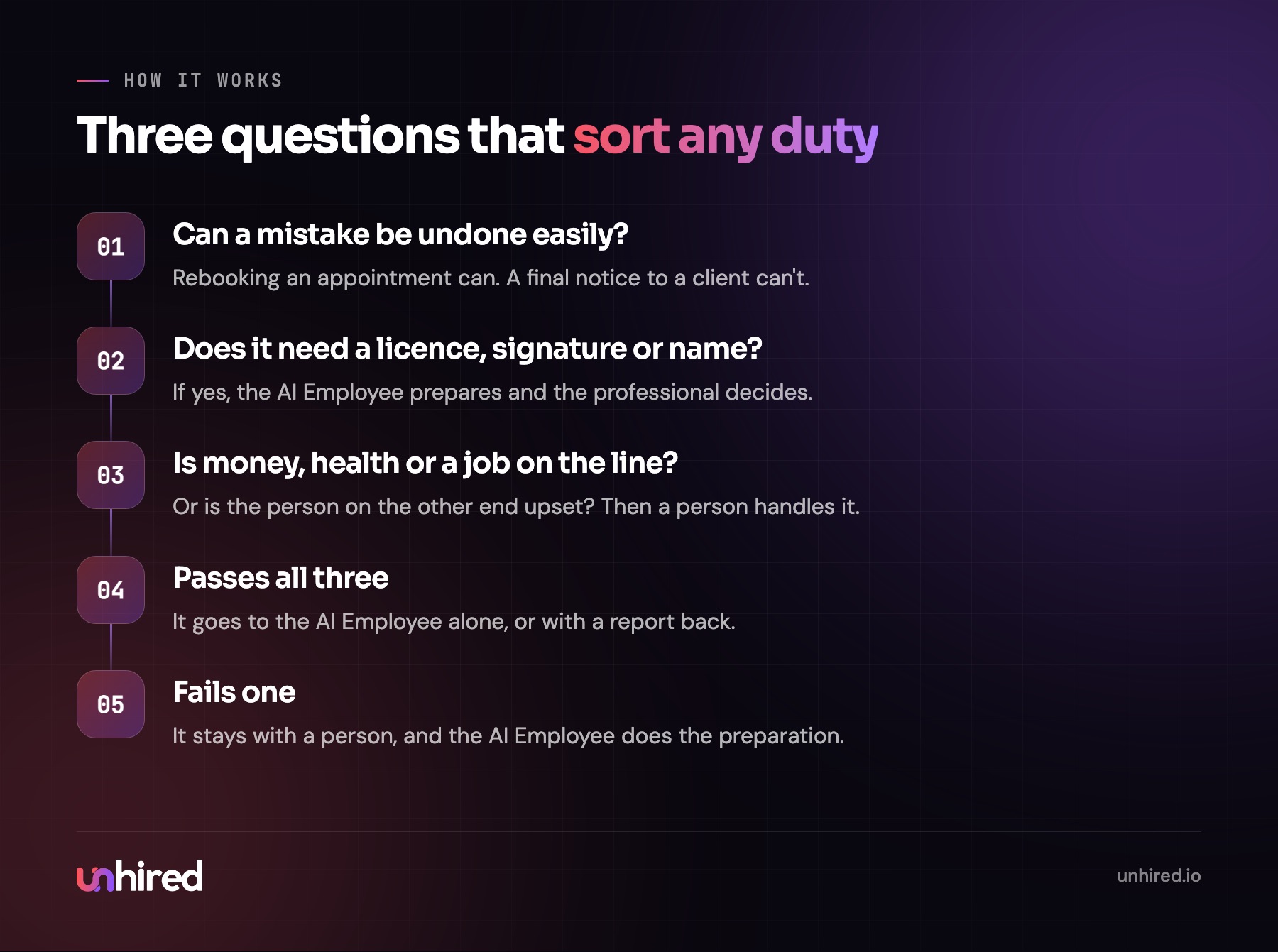
Can a mistake here be undone easily? Rebooking an appointment can. Sending a final notice to a client can't. Does the duty need a licence, a signature or a person's name on it? If so, the AI Employee prepares and the professional decides. Is someone's money, health or job on the line, or is the person on the other end upset? If yes, a person handles it.
A duty that passes all three can usually go to the AI Employee alone, or with a report back. A duty that fails one stays with a person, with the AI Employee doing the preparation.
When you finish the list you'll know whether the role suits an AI Employee. If most of the duties fail a question, it probably doesn't yet, and that's a useful answer too. AI Employee assessments, such as the one offered by Unhired, can be a good place to start if you want a second opinion on a specific role.
What the limits mean for the cost
The limits have a price: a person's time reviewing the log, approving what's above the line and handling escalations. In the first month that can be an hour or more a day. After that, a weekly review plus the escalations themselves is more typical, and the hours depend on how many duties sit in the "asks first" column.
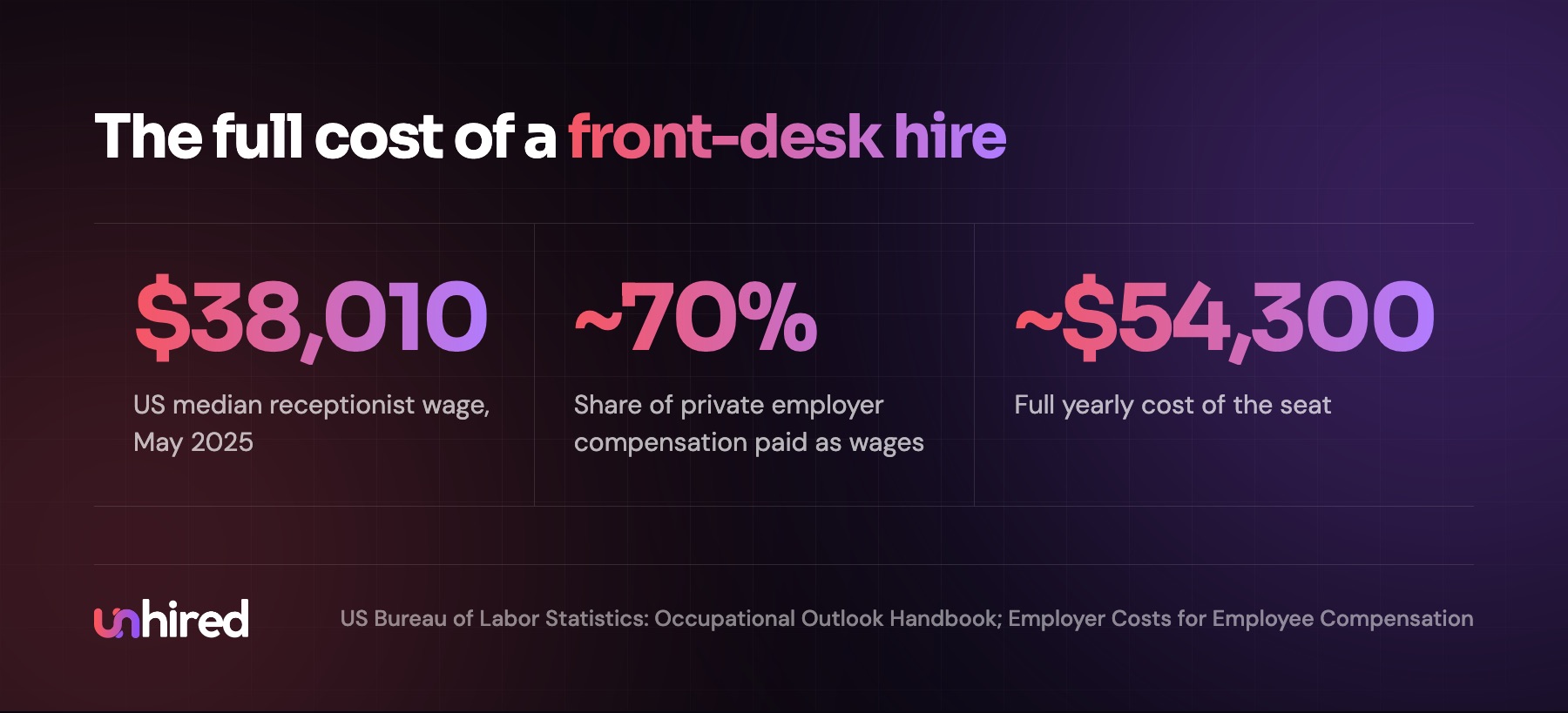
Count that time when you compare options. A business can assemble an AI Employee from software subscriptions and have someone on staff build and maintain it, or have a provider build and maintain it for a monthly fee. In both cases the review time is the business's own. Set it against the full cost of a hire. The US median wage for a receptionist was $38,010 in May 2025 (Bureau of Labor Statistics), and wages make up about 70% of what private employers spend on compensation (BLS Employer Costs for Employee Compensation), so that seat costs closer to $54,300 a year. Price out a provider's quote, or the software and staff time, the same way. My AI Employee cost post goes through the pricing models.
Where to start this week
Take the job you're thinking of handing to an AI Employee and write down five decisions you wouldn't let a new hire make in their first week. Those five are the start of its "asks first" list. Then add the dollar limit on refunds or credits, and the name of the person who gets each escalation. A page like that takes half an hour, and it's the page I'd want to see before anything else is built.
Wage data: US Bureau of Labor Statistics, Occupational Outlook Handbook, receptionists, May 2025 median; the full-cost figure uses the BLS Employer Costs for Employee Compensation share of wages in total compensation. The opening example is illustrative.