
A dental office manager signs up for an AI booking tool on a Friday, connects it to the practice calendar over the weekend, and switches it on Monday. By Wednesday it has booked a root canal into a 15-minute hygiene slot and told a patient the office takes an insurance plan it dropped last year. Nothing was wrong with the software. Nobody had told it how the office actually books, and nobody was checking its work.
I've spent the last four years building AI systems and agents for businesses, and most of the failed setups I've seen went wrong the same way: they skipped straight to the tool. The ones that work follow the same order as hiring a person. You write the job, decide who it reports to, test the candidate, and supervise the first few weeks. Here is that process, step by step.
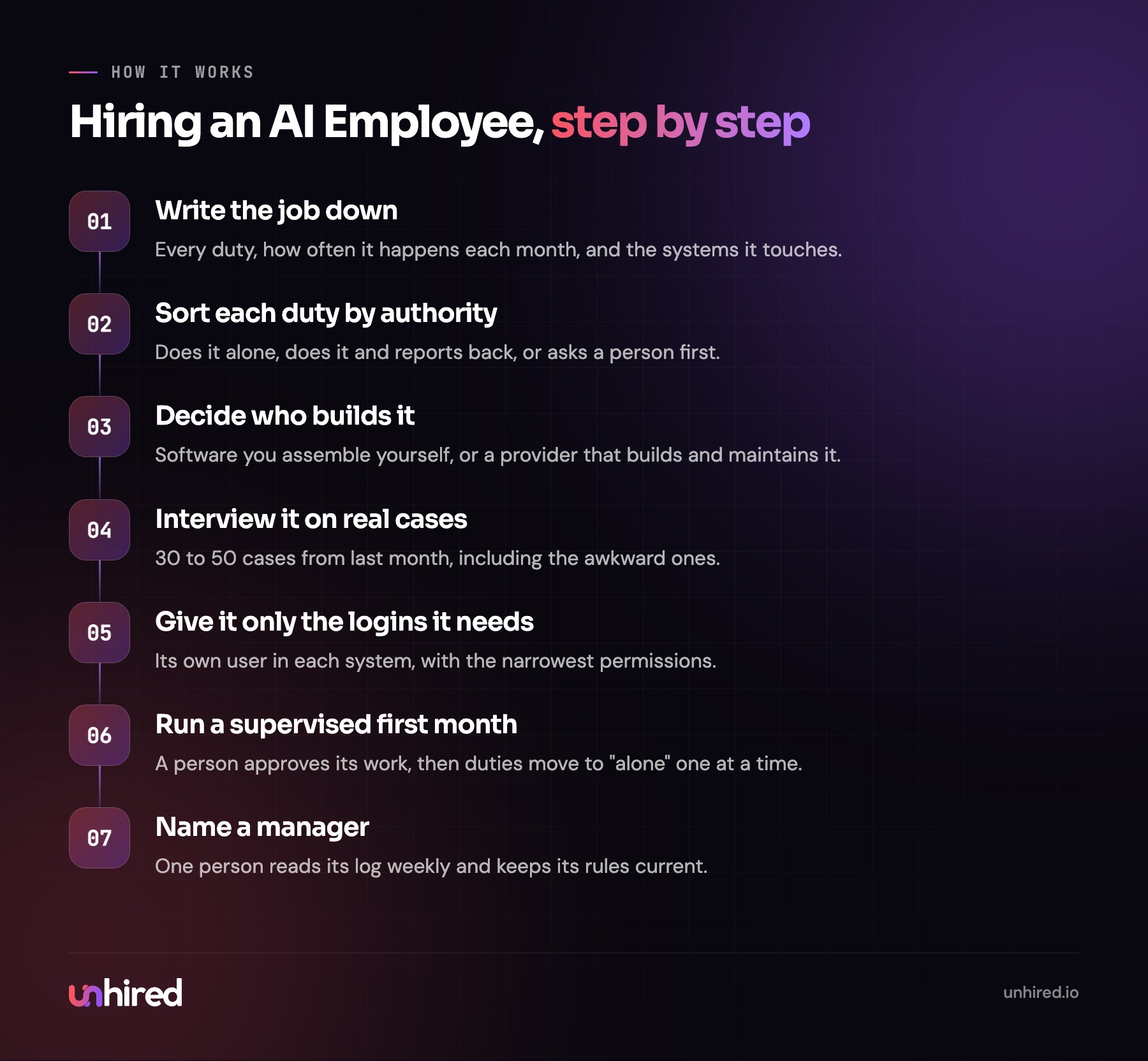
Step 1: Write the job down
An AI Employee is AI set up to hold one job on a team, with a title, a manager, logins to the systems the job runs on and written rules about what it does alone. So the first thing to write is the job, the same way you would before posting it on a job board.
List every duty. Next to each one, write roughly how often it happens in a normal month: 300 inbound calls, 80 booking changes, 40 invoices to chase. Then list every system the duty touches, by name. A property manager's list might read: tenant emails in Outlook, maintenance requests in Buildium, vendor scheduling by text, rent reminders. An e-commerce store's would say Shopify and Gorgias.
Be specific about the work nobody talks about. The front desk at a physiotherapy clinic doesn't only book appointments; it also chases expired referral letters and calls patients who missed two sessions in a row. If it isn't on the list, the AI Employee won't do it.
Step 2: Sort each duty by authority
This is the step that decides whether an AI Employee is safe to run. For every duty on the list, pick one of three levels.
The first is does it alone: low-risk, easy to undo, and logged. Sending a booking confirmation or a reminder for a missing form fits here. The second is does it and reports back: the work happens, and a person sees a summary. Screening applicants against the posting or answering routine order-status questions usually sits here. The third is asks first: anything that moves money, changes someone's pay, affects a legal deadline or deals with a complaint. The AI Employee prepares it and a person decides.
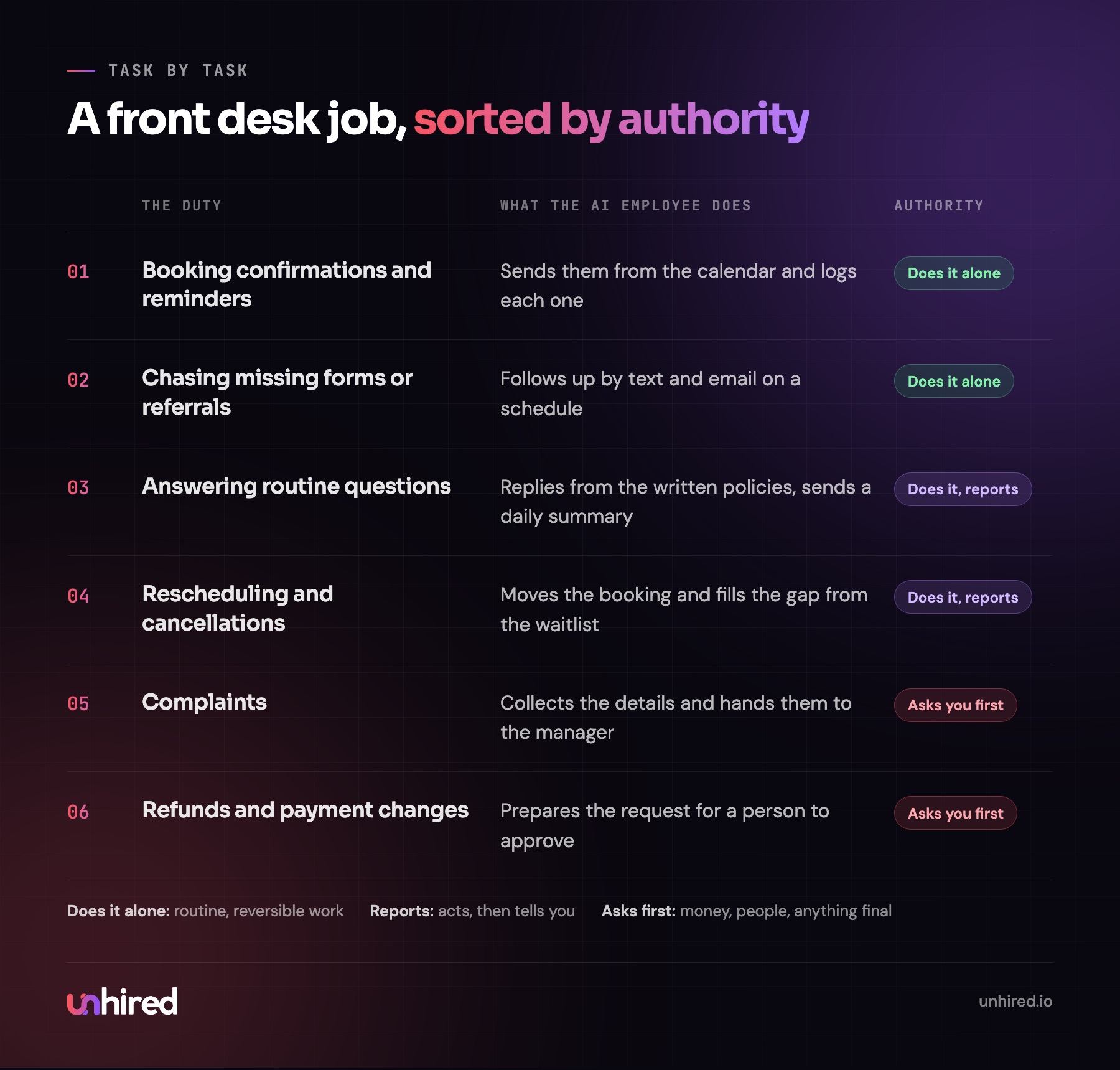
When owners do this exercise honestly, a few duties always end up as "asks first", and a few they assumed were simple turn out to be judgment calls. At a law firm, booking a consultation is routine, but deciding whether a caller has a conflict with an existing client is not. That second one stays with a person, and the AI Employee's job is to collect the details and flag it.
If you're unsure whether your role has enough "alone" and "reports back" duties to be worth it, this is the point to check. AI Employee assessments, such as the one offered by Unhired, can be a good place to start.
Step 3: Decide who builds it
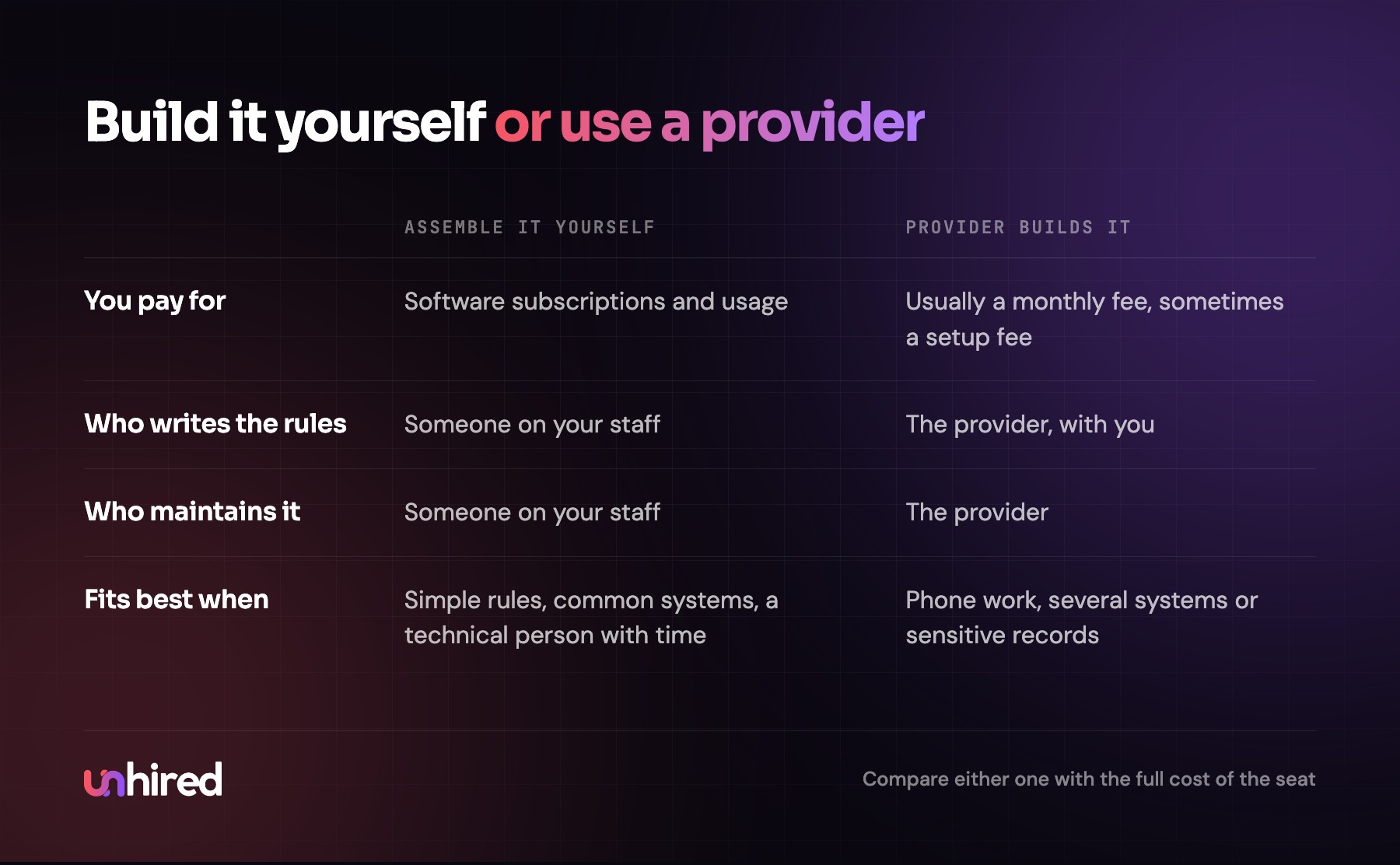
There are two common routes. You can assemble it yourself from software: an AI agent platform, connected to your email, calendar and the other systems on your list, with someone on staff writing the rules, testing and maintaining it. Or you can have a provider build and maintain it, usually for a monthly fee.
Building it yourself works when the job has simple rules, the systems are common ones with standard connections, and someone on your team has the time and the interest. It gets hard when the job runs on the phone, when an older system has no way for other software to connect, or when the work touches patient records or client funds. I covered how each route is priced in how much an AI Employee costs.
For a sense of scale, the US median wage for a receptionist was $38,010 in May 2025, according to the Bureau of Labor Statistics. Wages are about 70% of what private employers spend on compensation (BLS Employer Costs for Employee Compensation), so the seat costs closer to $54,300 a year. Whatever route you choose, that's the number to hold a quote against.
Step 4: Interview it on real cases
You wouldn't hire a person without an interview. The interview for an AI Employee is a test on your own past work.
Pull 30 to 50 real cases from last month: emails, call notes, booking requests, support tickets, whatever the job handles. Pick them on purpose. Include the easy ones, but also the angry customer, the request that was missing half the information, the one where the answer was "let me check with the manager", and the one that came in at 11 pm on a Sunday. Run each case through the AI Employee and put what it would have done next to what your staff actually did.
Grade three things. Did it get the answer right? Did it stay within its authority, stopping where the rules say to stop? And did it sound like your business? An accounting firm that writes formally to clients will notice fast if the replies sound like a chatbot.
Every miss points to a rule that's missing or unclear. Fix the rules and run the set again. I'd keep going until the misses are rare and every one left is something the approval steps would catch before a customer saw it.
Step 5: Give it logins, and only the ones it needs
A new hire gets a laptop and the accounts the job needs, and nothing else. Do the same here. If the job is booking appointments, it needs the calendar and the patient contact list. It doesn't need the billing system, and it shouldn't be able to delete records.
Where a system allows it, create a separate user for the AI Employee instead of sharing someone's login. That way its actions show up under its own name in the system's history, and you can switch it off in one place. Write down every account it has. That list is also your offboarding checklist if you ever stop using it.
Step 6: Run a supervised first month
For the first two to four weeks, run it in draft mode. It does the work, but a person approves each reply or action before it goes out. This is the probation period, and it does two jobs: it catches mistakes before customers see them, and it shows you the cases the test set missed.
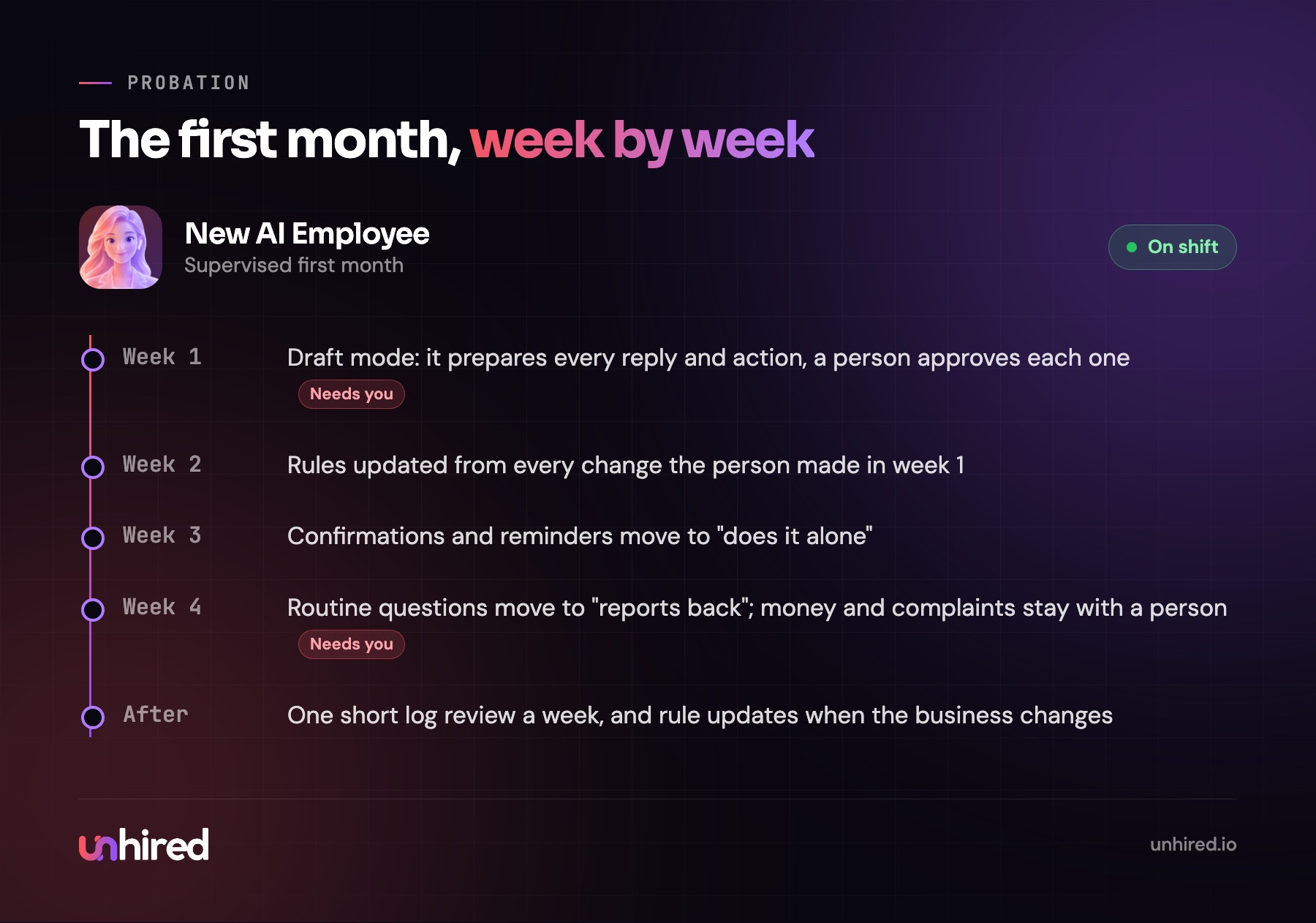
Loosen the controls one duty at a time. When a person has approved a week of booking confirmations without changing a word, move that duty to "does it alone". Keep complaints, refunds and anything financial at "asks first" for as long as you like. Some duties should never move.
Step 7: Name a manager and review it weekly
Every AI Employee needs one person it reports to. That person reads its log, handles what it escalates and updates its rules when the business changes. After the first month, this should be a short weekly review: skim the log and look closely at anything it held for approval or got wrong.
Businesses change, and the rules have to keep up. A clinic adds a new practitioner, or a store changes its return policy before the holidays. An AI Employee nobody updates gets a little more out of date each month. Whoever built it, someone on your side should know who keeps it current and how fast a change goes in.
Where to start this week
Take the job you'd most like to stop doing yourself, or the one you're about to post, and write the list from Step 1: duties, monthly volume, systems. Mark each duty "alone", "reports back" or "asks first". Then pull ten real cases from last month and keep them somewhere safe.
That one page and that folder of cases are most of what any builder or provider needs to give you a straight answer, and they're the start of the test you'll run before it goes live. If the role on your page is front-desk work, my AI Receptionist post walks through that job in more detail.
Wage data: US Bureau of Labor Statistics, Occupational Outlook Handbook, receptionists, May 2025 median; full-cost figure uses the BLS Employer Costs for Employee Compensation share of wages in total compensation. The opening example is illustrative.