
A wholesale distributor with 20 staff gets about 40 supplier invoices a week. Most arrive as PDFs attached to emails, a few come in the mail, and one supplier still faxes. Someone opens each one, finds the matching purchase order, keys the line items into the accounting system and files the PDF. On a good week that takes most of two days. On a bad week, a unit price changed and nobody caught it until the month-end reconciliation.
Data entry is the job I get asked about most often by owners who want to try an AI Employee, and it's a good first choice. It's also the one people set up wrong most often, because they think the hard part is reading the document. The reading is the easy part. The checks are the job.
What an AI Data Entry clerk is
An AI Data Entry clerk is an AI Employee that holds the data entry job in a business. It watches the places documents arrive, such as a shared inbox or a scanner folder, reads each document, enters the fields into the right system and files the original. It has logins to those systems with only the access the job needs, a written set of rules for what it enters on its own and what it holds, and a person it reports to. Every record it creates goes into a log with a link back to the source document.
I've spent the last four years building AI systems and agents for businesses. Pulling a total and a date out of a typed invoice has been reliable for a while. What separates a useful AI Data Entry clerk from a demo is what happens next: whether it checks the entry against something it already knows, and whether it stops when it can't.
The data entry job, step by step
Most data entry follows the same five steps no matter what the document is.
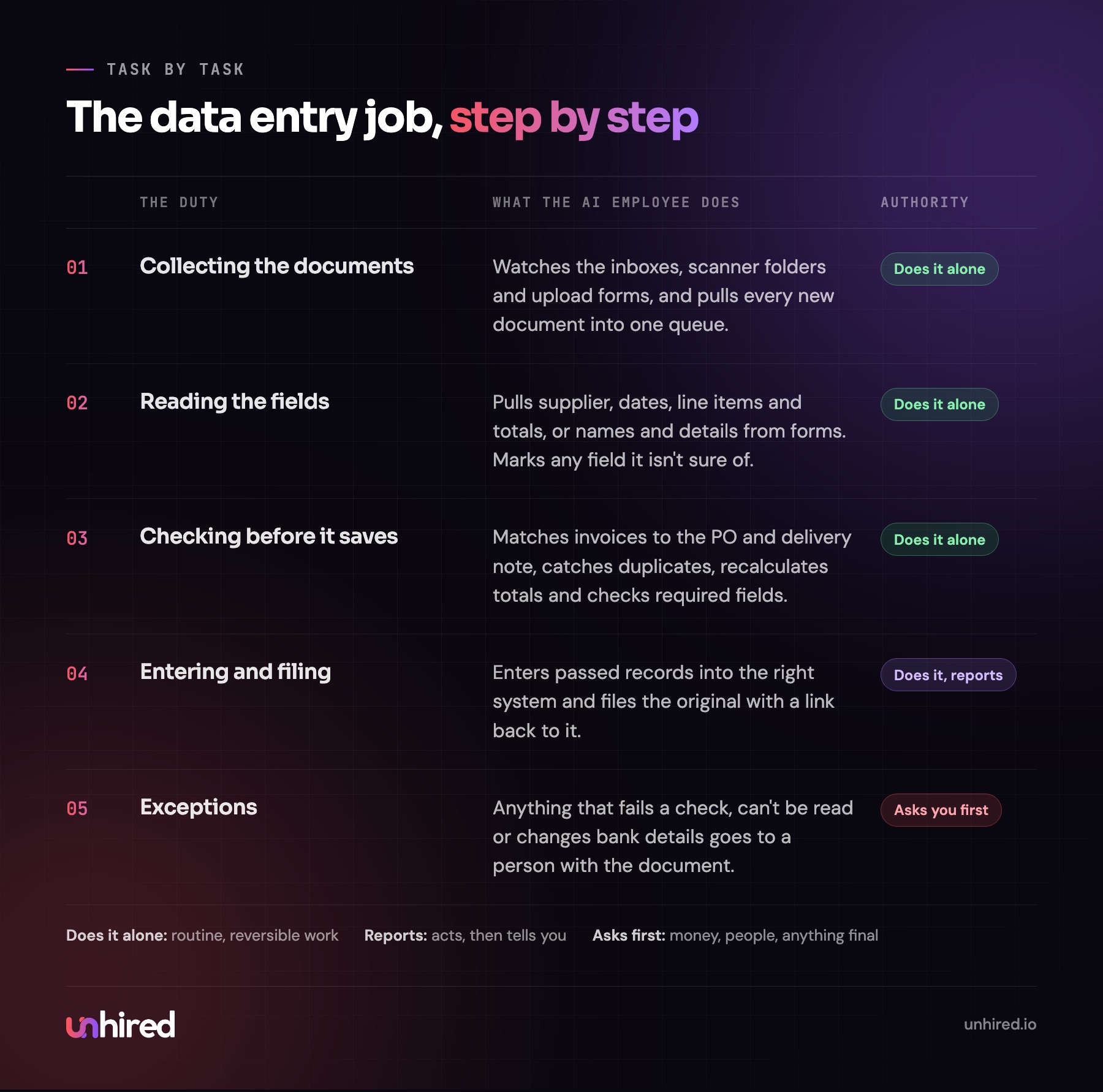
Collecting the documents
Documents arrive everywhere. Invoices come to accounts@, intake forms come through the website, delivery notes get photographed on a phone, and a few things still come in the mail and get scanned. The AI Employee watches each of those places and pulls every new document into one queue, so nothing sits in someone's personal inbox for a week.
Reading and pulling the fields
For each document it pulls the fields the business cares about. On a supplier invoice that's the supplier, invoice number, date, PO number, each line with quantity and unit price, tax and total. On a patient intake form it's name, date of birth, insurance details, allergies and the reason for the visit. Typed PDFs read cleanly. Handwriting and blurry phone photos are where it slows down, and that's fine as long as it knows when it isn't sure.
Checking before it saves
This is where the job is done well or badly. Before anything goes into a system, the AI Employee compares it to what's already there:
- An invoice gets matched to the purchase order and the delivery note. Quantities and unit prices have to agree.
- A new client record gets checked for duplicates, so "J. Smith" and "John Smith" at the same address don't become two files.
- Totals get recalculated from the line items. If the supplier's math is wrong, it gets flagged.
- Required fields have to be complete. An intake form without a date of birth doesn't get entered half-done.
- An invoice number the system has already seen gets held as a possible duplicate payment.
A record that passes every check gets entered. One that fails any check goes to a person with the document, the field in question and what it expected to see.
Entering and filing
Passed records go into the system they belong in: the accounting software, the practice management system, the CRM, the inventory sheet. The original document gets renamed and filed where the business's rules say it goes, and the record links back to it. If an auditor or a client asks where a number came from, the answer is one click away.
Handing over the exceptions
Every morning the person it reports to gets a short list: what was entered yesterday, and what's waiting on them and why. In most businesses I'd expect that list to be a small share of the volume once the rules are settled. The first few weeks it will be longer, because that's how the rules get written.
What it looks like in different businesses
The steps don't change much. The documents and the systems do.
At a dental or medical clinic, it's the intake and insurance forms before a first visit, plus referral letters that arrive by fax and need to be attached to the right patient chart. A small law firm uses it to open new matters from intake forms, log incoming correspondence against the right file and enter time from notes into the billing system. For a property manager, it's lease applications, maintenance invoices from contractors and the move-in inspection forms. An e-commerce brand points it at supplier packing lists and returns, so stock counts match what's actually on the shelf. And at the distributor from the opening, it's the three-way match between purchase order, delivery note and invoice.
If most of your volume is invoices and payments, my AI Bookkeeper post goes further into the accounting side.
What should stay with a person
These are the lines I'd draw at any business:
- Bank and payment details. A supplier invoice with new banking information is a classic fraud attempt. The AI Employee never updates payment details. It flags the change, and a person confirms it by phone with a contact the business already knows.
- Approving payments. It can prepare a matched invoice for payment. A person releases the money.
- Overwriting or deleting existing records. It adds and it flags. If a record on file looks wrong, a person decides which version is right.
- Anything it couldn't read with confidence. A smudged dosage on a medical form or a handwritten figure that could be a 1 or a 7 goes to a person, every time.
- Sensitive records it hasn't been cleared for. Health, legal and payroll information get their own permissions, set deliberately.
A day on the job
Here's an example day for an AI Data Entry clerk at that same distributor. Two items go to the office manager.
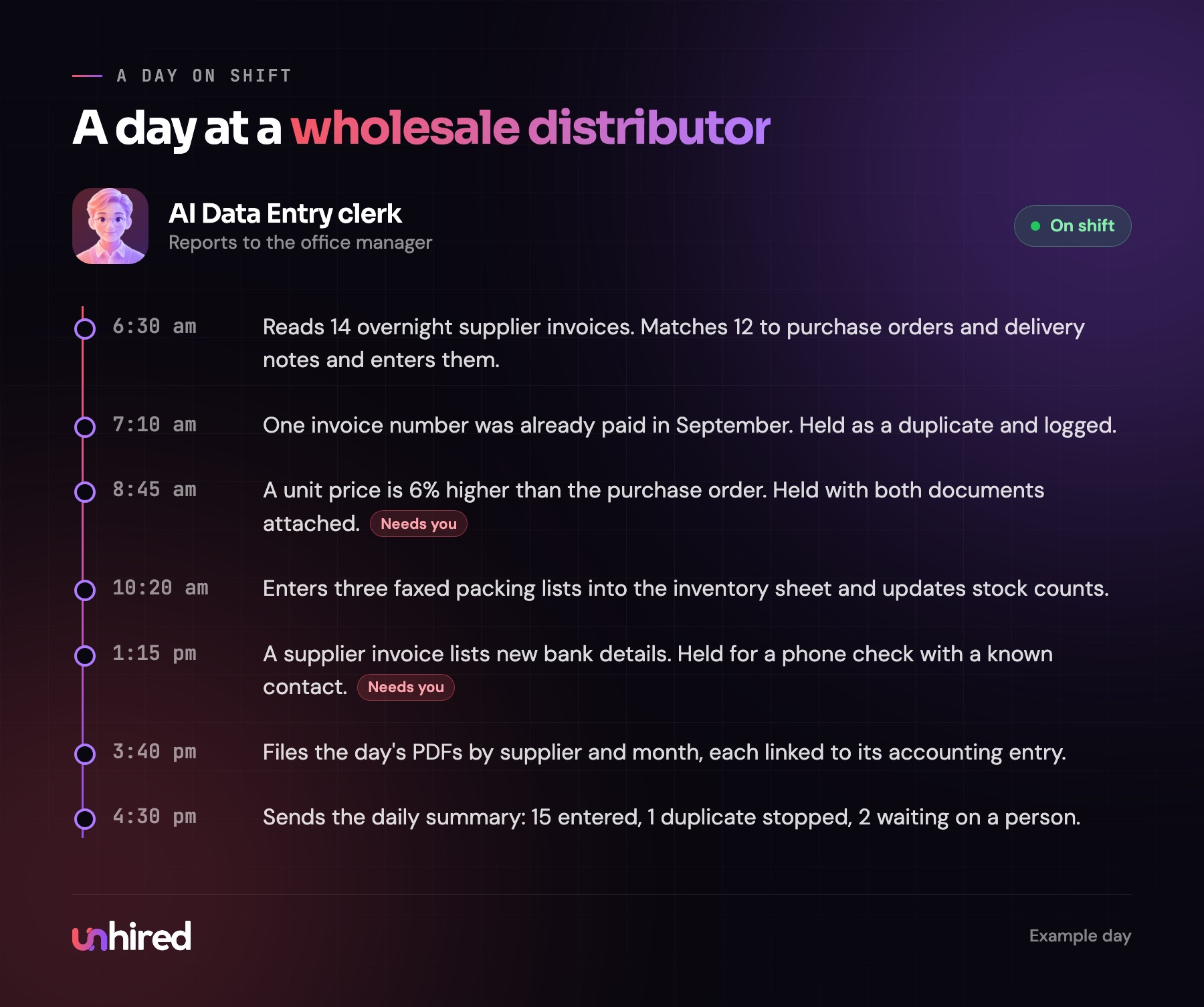
Overnight invoices are matched and entered before anyone is in. The duplicate invoice never gets paid twice. The price change and the new bank details both reach a person with the document attached, which is the whole point of having checks.
What a data entry clerk costs
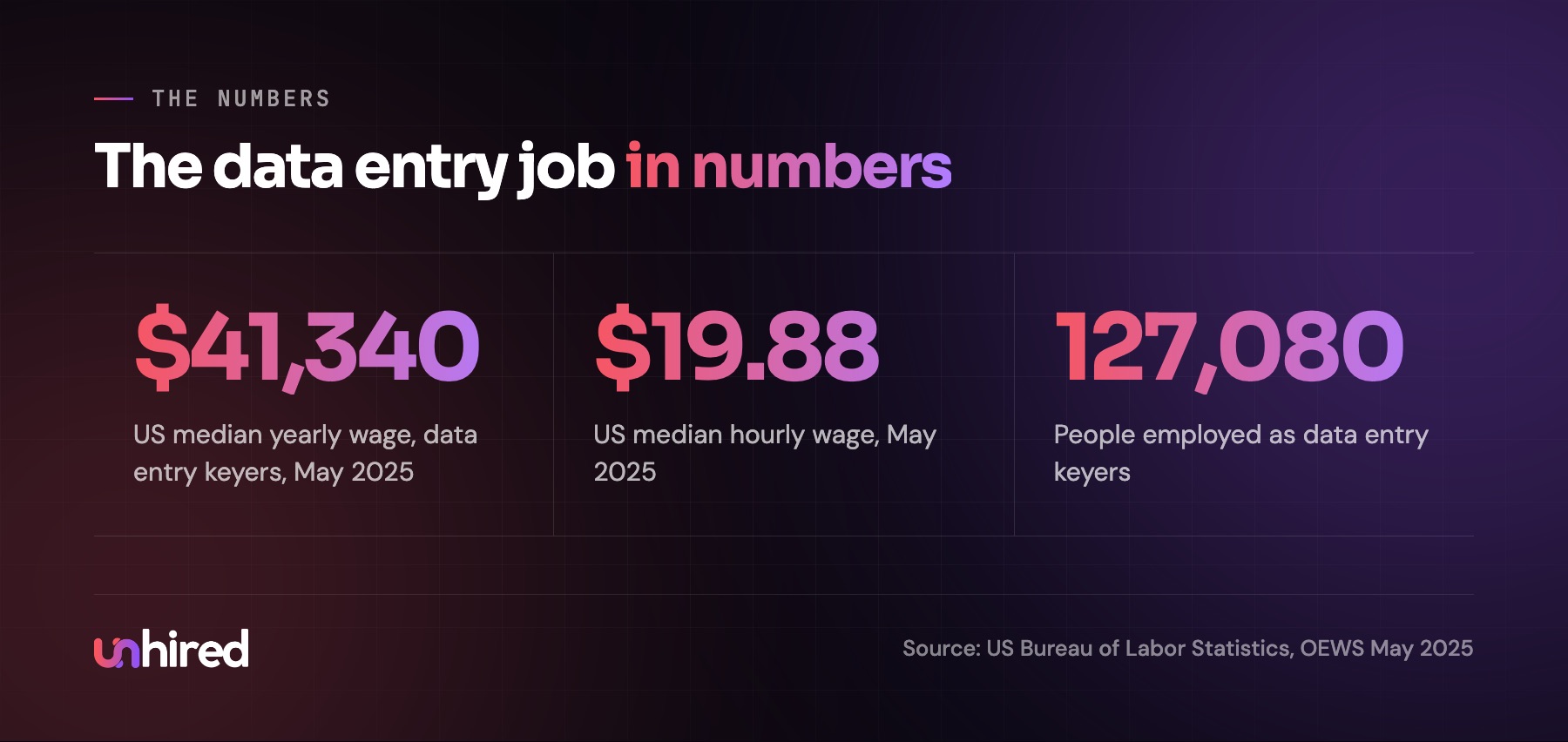
The US Bureau of Labor Statistics puts the median wage for data entry keyers at $41,340 a year in May 2025, or $19.88 an hour. BLS counts about 127,080 people in the occupation. A lot of data entry is also done by general office clerks, receptionists and bookkeepers as part of a wider job, so the real amount of this work in a business is usually spread across several people.
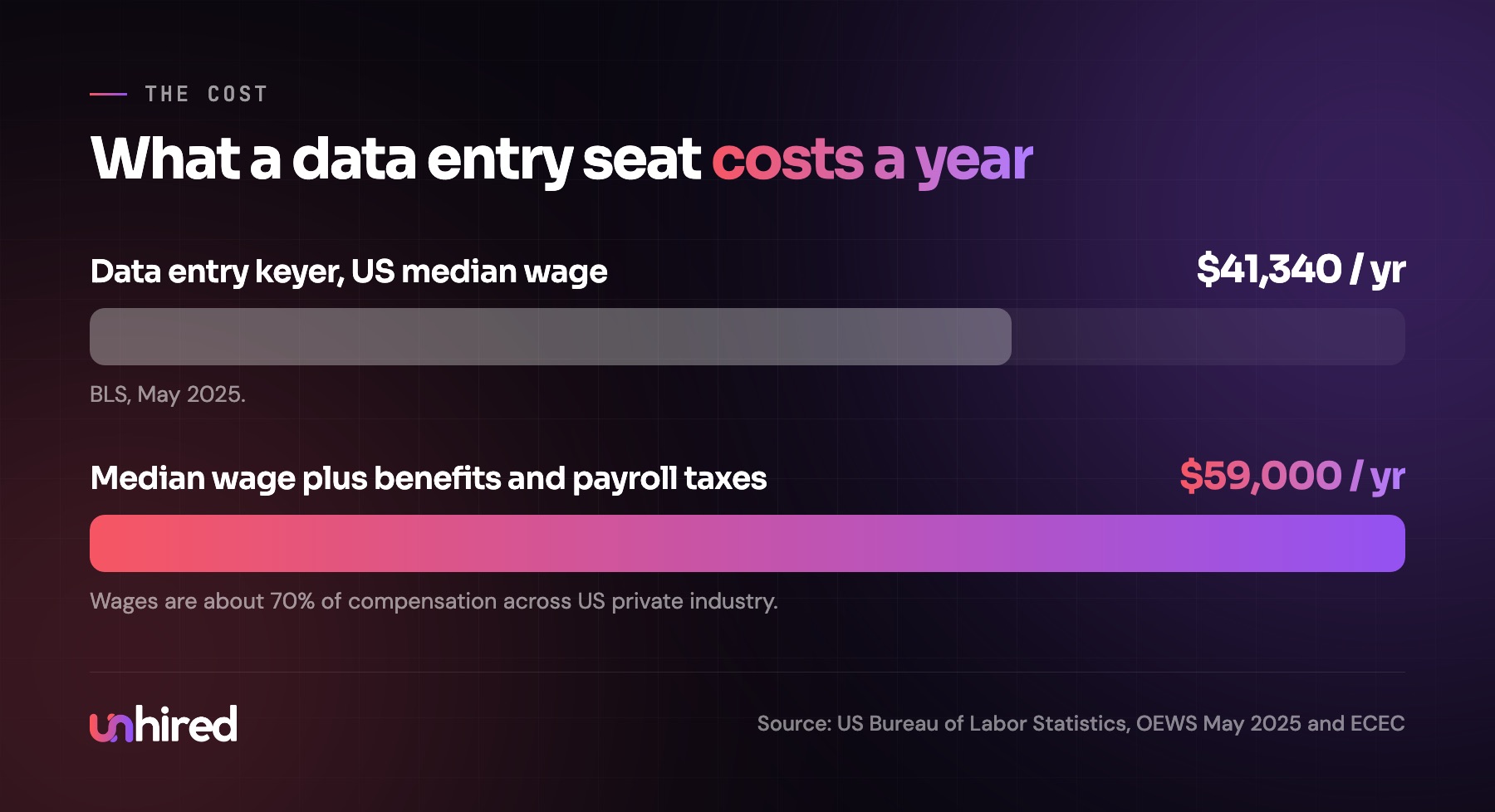
The wage is only part of the cost. Across US private industry, wages and salaries are about 70% of what employers spend on compensation, according to the BLS Employer Costs for Employee Compensation report. At the median wage, that puts one data entry clerk at about $59,000 a year, before recruiting and training.
How much you'd pay for an AI Data Entry clerk
There are two ways to get one.
Building it yourself. Document-reading tools (often sold as OCR or intelligent document processing) and AI agent platforms can read PDFs and connect to many accounting systems, CRMs and spreadsheets. The software is usually the smaller cost. The bigger one is the time someone on staff spends writing the checks, connecting each system, testing on real documents and keeping it current as suppliers and forms change.
Having it built and maintained. A provider sets it up, writes the rules with the business, connects the systems and keeps it updated, usually for a monthly fee.
What drives the price is volume (how many documents a month), how many different layouts it has to handle, how many systems it enters into, whether those systems let software log in and work in them, and how strict the checks need to be. A law firm entering 30 intake forms a month needs much less than a distributor matching 600 invoices against purchase orders.
When you compare quotes, line them up against the full cost of the seat, about $59,000 a year at the US median, and ask each provider what happens to a document the AI Employee can't read. A good answer names the person who sees it and how fast.
How an AI Data Entry clerk is set up
Setup starts with real documents, not a description of them.
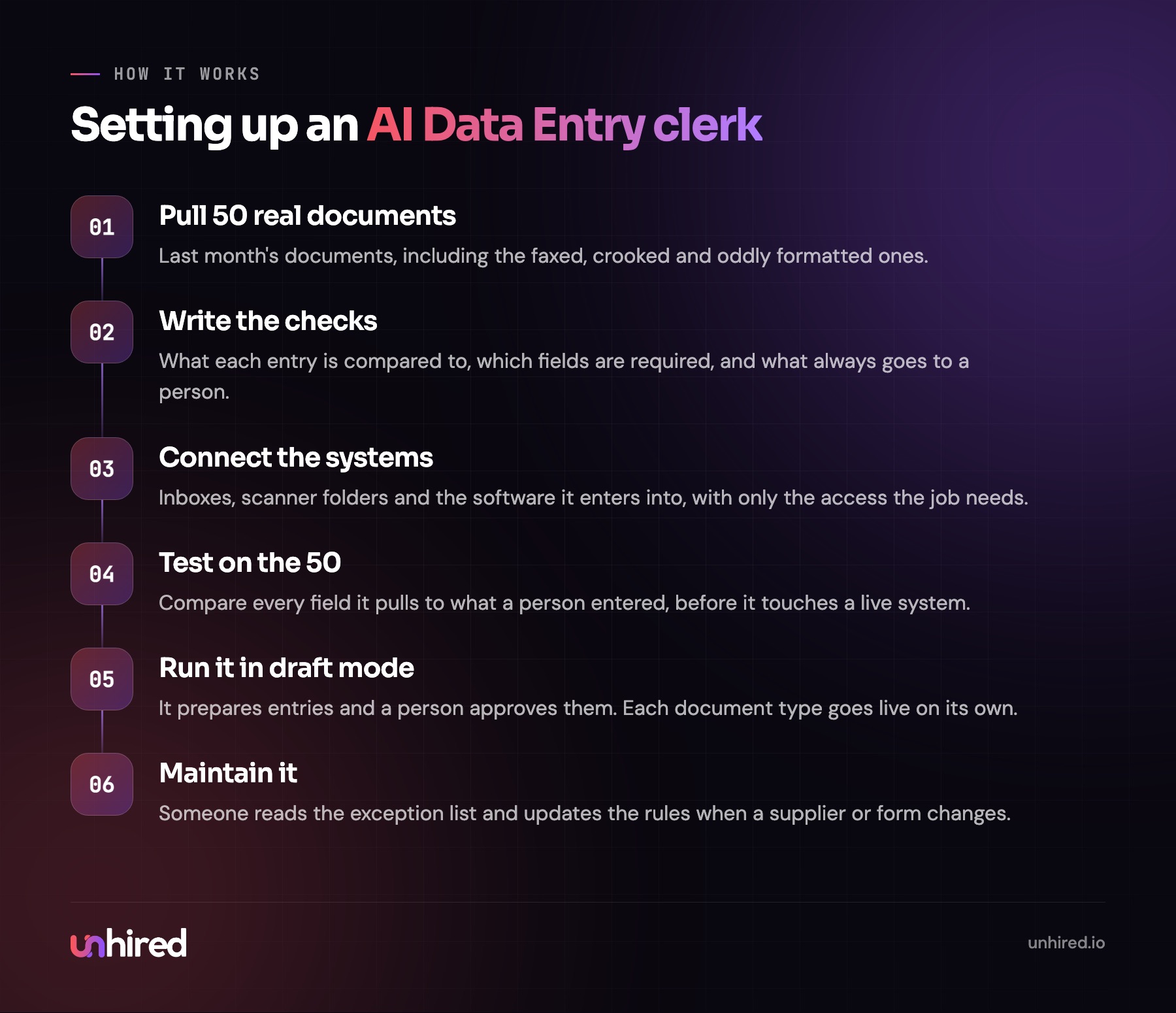
The step I'd never skip is the test set. Pull 50 real documents from last month, and make sure the messy ones are in there: the faxed invoice, the photo taken at an angle, the supplier who changed their template in June. Run the AI Employee on them before it touches a live system and compare every field to what a person entered. After that, it runs in draft mode for a couple of weeks, preparing entries that a person approves, and each document type goes live once its error rate is where the business wants it.
Where it fits and where it doesn't
If your business receives a steady stream of documents that someone retypes into software, an AI Data Entry clerk can hold most of that work, and the person doing it today gets their time back for the exceptions and the calls that need judgment. A business that gets a handful of documents a week may find the setup is more effort than it saves, and a simpler tool inside the accounting software might be enough. Mostly handwritten paperwork means more of it will reach a person.
Some websites offer free assessments that check whether a role can be filled by an AI Employee, which is a quick way to see where data entry sits in a wider job.
A useful first step takes an afternoon. Pick one document type (supplier invoices, intake forms, whatever arrives most) and count how many came in last month, how long each took to enter, and how many had a mistake someone fixed later. Those three numbers tell you how big the job is and how much the checks are worth.
Wage data: US Bureau of Labor Statistics, Occupational Employment and Wage Statistics, May 2025, and Employer Costs for Employee Compensation. The distributor day is an example built from the duties in this post.